How do I adjust the location frequency on the Endurance?
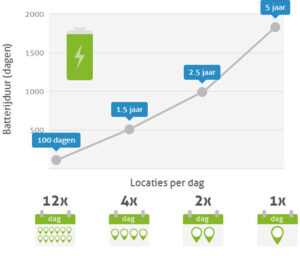
You can select a different frequency. Please note that this may affect battery life (see image below). If you wish to adjust the frequency, it is important that the system is connected to the server. To do this, switch off the Endurance by unscrewing the system and sliding the switch from ‘on’ to ‘off’. You can then switch the Endurance back on. The system will now remain switched on for 2 hours and can receive the command to adjust the frequency within that time.
If you do not have the system to hand, you can only adjust the frequency when the system is transmitting a location. For example, if the Endurance is set to measure a location at 11:00, you can adjust the frequency between 10:55 and 11:00.
Please note! Adjusting the frequency costs one credit. If you do not have any credits, you can order them here.