
How do I renew my service or service level?
If you have purchased a 12-month service level, you will be automatically notified when it is due to expire. You will receive this notification by email and via your online account.
Renewing is easy. Follow the steps below or watch the video.
- Go to 'Management > Systems' in your account
- Click on the vehicle you wish to renew and click on 'Renew service'.
- You will now see the vehicle(s) you can renew in the first column. Tick the system or systems you wish to renew.
- In the second column, select the service you wish to renew.
- Enter your address details in the third column and click on 'Proceed to order'.
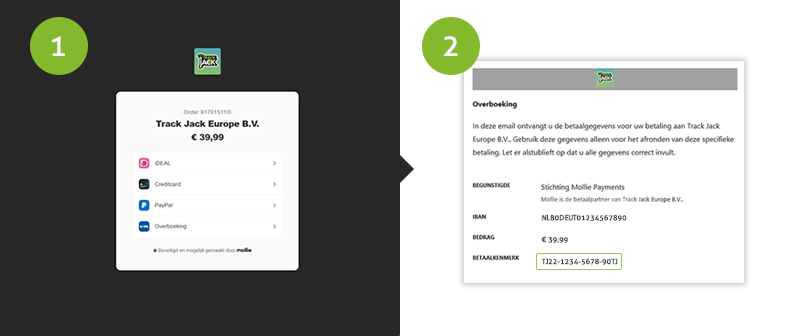
- You can now choose your preferred payment method (such as iDEAL, Credit Cards, PayPal and more). Complete your payment.
- Once payment has been successfully processed, you will be redirected to your online account where your service will be automatically renewed.
What if I can’t make an iDEAL payment myself?
No problem. Among the payment methods we offer is a bank transfer. After placing your order, you will receive a screen and an email containing the account number, payment reference and details to use. As soon as this payment is made, the TrackJack systems will be automatically renewed.
Please note: it may take up to 3 minutes for your service to be automatically renewed.
You can close the pop-up; the service will be renewed in the background.
You can close the pop-up; the service will be renewed in the background.
Tags: Order service level, order service levels, renew service level, renew. service code