
Farewell to the service code
The end of an era. For years, the service code has been the go-to way to renew your TrackJack. The steps to renew your TrackJack have now become so much easier and better that the service code is actually no longer needed.
Is your TrackJack service about to expire? You’ll be notified via your online account and by email. Renewing is now easier than ever.
- Go to 'Management > Systems' in your account
- Click on the vehicle(s) you wish to renew and click on 'Renew service'.
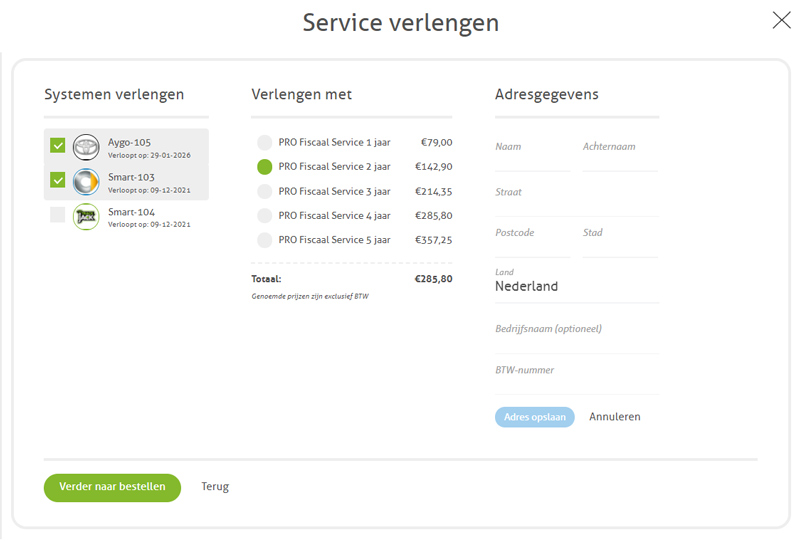
- You will now see the vehicle(s) you can renew in the first column. Tick the system or systems you wish to renew.
- In the second column, select the duration for which you wish to renew.
- Enter your address details in the third column and click on 'Proceed to order'.
- You can now choose your preferred payment method (such as iDEAL, credit card, PayPal, bank transfer and more). Complete your payment now.
- After successful payment, you will be returned to your online account. Your service will now be automatically renewed. You therefore no longer need to use a code or take any further action!
Please note: it may take up to 3 minutes for your service to be automatically renewed.
You can close the pop-up; the service will be renewed in the background.
You can close the pop-up; the service will be renewed in the background.
Watch the video too:
Do you have Green Driving or Live Tracking?
If so, you cannot yet renew via your online account. Please follow the steps in this FAQ.
Has your service expired?
Has your service level expired some time ago? In that case, you will need to purchase a reactivation to restore the TrackJack’s service level. This will be automatically included in your renewal.
Tags: Order service level, order service levels, renew service level, renew. service code